
Introduction
Technical health is the backbone of any successful search engine optimization strategy. Without a solid infrastructure, even the most compelling content and authoritative backlinks may fail to drive organic traffic. Search engines rely on specific technical signals to crawl, index, and understand web pages. When these signals are broken or missing, a site loses visibility in search results. This is why learning how to fix technical SEO issues is a non-negotiable skill for digital marketers and website owners.
Why this matters
Technical SEO directly impacts a website's ability to communicate with search engine bots. If a bot cannot access a page due to a blocked `robots.txt` file or complex JavaScript rendering, that page will not appear in search results. Furthermore, technical errors often degrade the user experience. Factors such as slow page load speeds, mobile-unfriendly designs, and broken links increase bounce rates and reduce conversions.
Common technical pitfalls include:
- Duplicate content creating confusion over which version to index
- HTTP status errors like 404s preventing link equity flow
- Missing XML sitemaps hindering efficient crawling
- Unsecure HTTP connections triggering security warnings
Addressing these underlying problems ensures that a website is accessible, secure, and fast. By resolving technical barriers, businesses pave the way for content to rank and for users to convert efficiently.
Automate Your Technical SEO Fixes
Identify and resolve crawl errors, broken links, and site speed issues instantly with Semrush’s comprehensive Site Audit tool.
Fixe 1: Optimize Site Speed and Core Web Vitals
Site speed directly impacts user experience and search rankings. Search engines prioritize pages that load quickly and provide a smooth visual experience. Core Web Vitals measure specific aspects of user interaction, including loading speed, interactivity, and visual stability. If a page takes too long to load or shifts layout unexpectedly, visitors often leave, increasing bounce rates.
To effectively fix technical SEO issues related to speed, focus on these implementation steps:
- Compress images: Use modern formats like WebP and reduce file sizes without losing quality.
- Minify code: Remove unnecessary spaces, comments, and characters from HTML, CSS, and JavaScript files.
- Leverage browser caching: Configure your server to store static resources locally on visitors' devices for faster subsequent loads.
- Eliminate render-blocking resources: Defer non-critical JavaScript and CSS to prioritize the loading of visible content.
Regularly test your performance using tools that analyze these specific metrics. Small adjustments to code and assets often yield significant improvements in page load times.
Fixe 2: Resolve Broken Links and 404 Errors
Broken links and 404 errors disrupt user experience and waste crawl budget, negatively impacting rankings. When visitors encounter dead ends, they often leave the site, increasing bounce rates and signaling poor content quality to search engines. Understanding how to fix technical SEO issues requires identifying these broken URLs and repairing them efficiently.
To implement this fix, audit your website regularly using crawling tools to detect 404 status codes. Once identified, choose the most appropriate resolution for each broken link based on the context of the missing page.
- Update the link: If the target page was moved and a new URL exists, update the internal hyperlink to point to the correct location.
- Implement a 301 redirect: If the content is permanently moved or consolidated, set up a 301 redirect to guide users and search engines to the most relevant replacement page.
- Restore or delete: If the page was deleted by mistake, restore it. If it serves no purpose and has no suitable replacement, remove the internal link pointing to it entirely.
Fixe 3: Implement Secure Sockets Layer (SSL)
Security is a top priority for search engines and users alike. Migrating from HTTP to HTTPS encrypts data transferred between a web server and a browser, ensuring that sensitive information remains private. Search engines use HTTPS as a ranking signal, meaning secure sites often have an advantage in search results. Furthermore, browsers warn users when they visit non-secure sites, which significantly increases bounce rates and damages trust.
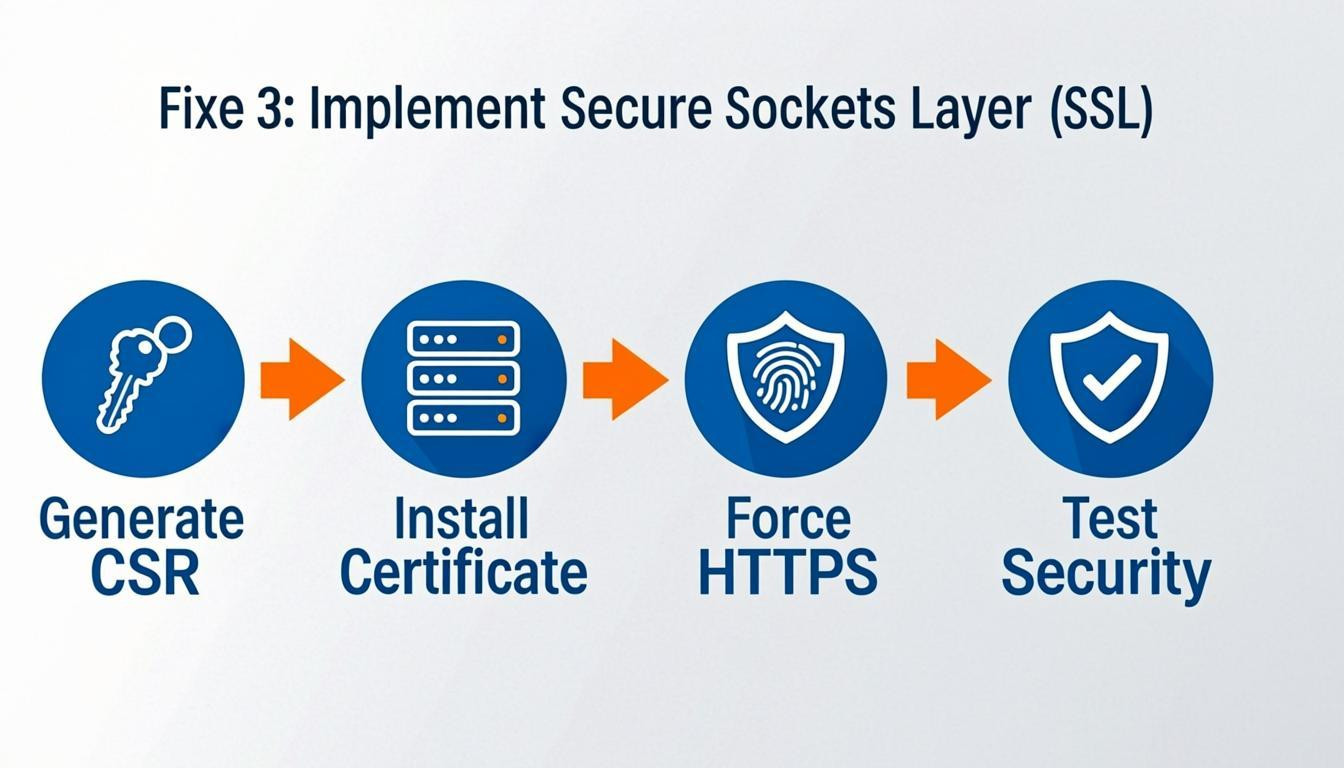
To implement SSL correctly, follow these steps:
- Purchase an SSL certificate from your hosting provider or a Certificate Authority.
- Install the certificate on your web server. Many hosts offer a one-click installation via their control panel.
- Update internal links to ensure all pages, images, and resources use the HTTPS protocol.
- Set up 301 redirects to automatically route HTTP traffic to the secure HTTPS version, preserving link equity.
- Update the HTTPS version in Google Search Console to index the secure property.
For example, a user visiting `http://yourdomain.com` should automatically be redirected to `https://yourdomain.com` without encountering browser warnings.
Fixe 4: Create and Submit an XML Sitemap
An XML sitemap acts as a blueprint of your website, guiding search engine crawlers to your most important pages. This file lists URLs along with metadata like last modification dates and update frequencies, ensuring search engines discover and index content efficiently. For websites with complex architectures or new sites with few backlinks, a sitemap is critical for visibility.
To implement this fix effectively, follow these steps:
- Generate the file: Use a CMS plugin, such as Yoast SEO or Rank Math, or an online generator to create the XML file.
- Review and refine: Open the file and remove any duplicate URLs, broken links, or pages blocked by robots.txt directives. Focus on including canonical versions of high-value pages.
- Submit to search consoles: Upload the sitemap via Google Search Console and Bing Webmaster Tools under the "Sitemaps" section.
- Update robots.txt: Add a directive pointing to the sitemap location (e.g., `Sitemap: https://example.com/sitemap.xml`) for easy discovery.
Regularly updating the sitemap whenever you publish or remove content ensures that search engines maintain an accurate index of your site.
Fixe 5: Fix Duplicate Content Issues
Search engines struggle to determine which version of a page to index when identical or significantly similar content exists across multiple URLs. This dilutes link equity and can prevent the correct page from ranking. To resolve this, you must consolidate authority signals to a single, canonical source.
How to implement:
- Set Canonical Tags: Implement the `rel="canonical"` HTML element in the header of duplicate pages. This directive tells search engines that a specific URL is the master copy.
- Utilize 301 Redirects: If duplicate pages serve no purpose and receive traffic, permanently redirect them to the primary version using a 301 redirect. This transfers both users and ranking power.
- Handle Parameters: For URLs created by tracking parameters or sorting filters, use Google Search Console to specify how these parameters should be handled.
- Consolidate Content: If multiple pages target nearly identical keywords, merge them into one comprehensive, authoritative guide.
Fixe 6: Optimize Mobile Responsiveness
Mobile optimization is a critical factor when determining how to fix technical SEO issues, as search engines prioritize the mobile version of a site for indexing and ranking. A site that functions flawlessly on desktop but fails on mobile will likely suffer in search visibility and user retention. To address this, ensure your layout adapts fluidly to various screen sizes without requiring horizontal scrolling or zooming.
How to implement:
- Adopt a responsive design: Use CSS media queries to adjust the layout based on the device width.
- Configure the viewport: Include the `` tag in your site's head section to ensure proper rendering.
- Optimize touch targets: Ensure buttons and links are large enough (at least 48x48 pixels) to be tapped easily without accidental clicks.
- Improve loading speeds: Compress images and minimize code to reduce load times on cellular connections.
Regularly test your pages using mobile simulation tools to verify text readability and navigation ease.
Fixe 7: Improve Crawlability with Robots.txt
A robots.txt file acts as a set of instructions for search engine bots, directing them on which parts of your site to crawl and which to avoid. If configured incorrectly, it can accidentally block critical pages, preventing them from ranking. To learn how to fix technical SEO issues related to indexing, you must audit this file to ensure it allows access to essential content while restricting unnecessary areas like admin folders.
To implement this fix, locate your `robots.txt` file in the root directory of your domain (e.g., `yourdomain.com/robots.txt`). Review the directives and adjust them accordingly:
- Allow key resources: Ensure your CSS, JavaScript, and image files are not blocked, as modern search engines need these to render your pages effectively.
- Block low-value areas: Use the `Disallow` directive for folders containing duplicate content, such as search results pages, tag archives, or administrative backend panels.
- Validate your syntax: Use Google Search Console's Robots.txt Tester tool to check for errors before saving your changes.
Properly managing this file streamlines the crawling process, ensuring search bots focus their crawl budget on your most valuable pages.
Conclusion
Addressing website health is essential for achieving long-term search visibility. Learning how to fix technical SEO issues allows site owners to create a solid foundation that supports content and link-building efforts. Without a technically sound architecture, even the most valuable pages may struggle to rank.
Core areas to monitor include site speed, mobile-friendliness, and crawlability. Search engines must be able to easily access and index content. Regular audits help identify problems early, preventing significant drops in organic traffic.
Key takeaways include:
- Prioritize Crawl Efficiency: Ensure robots.txt directives and XML sitemaps guide bots accurately.
- Optimize Core Web Vitals: Improve loading speed and visual stability to enhance user experience.
- Fix Duplicate Content: Use canonical tags to consolidate signals for similar pages.
- Implement HTTPS: Security is a confirmed ranking factor and builds user trust.
- Structure Data: Use schema markup to help search engines understand context.
Resolving these technical barriers ensures that a website communicates effectively with search engines. This process requires ongoing attention, as algorithms and web standards evolve constantly. By maintaining a clean and efficient site structure, businesses ensure their content has the best possible chance of reaching the target audience.
Comments
0