
Introduction
Launching a WordPress site is relatively easy, but keeping it running smoothly for the long haul is where things get tricky. For most people, the challenge isn't the initial build—it's everything that comes after. Users often spend weeks picking the perfect theme and filling it with content, only to let the critical technical maintenance slide once the site goes live.
This oversight leads to a host of common problems. For instance, forgetting to swap out temporary staging URLs can leave you with broken images and dead links all over your pages. Security risks also creep in when database protection is ignored, debug modes are left on, or the theme and plugin editors remain active in the dashboard.
To keep visitors happy, you need to constantly check that your site works well on mobile and that contact forms actually function. Without a solid plan for updates and security, performance tends to degrade pretty quickly. It creates a vicious cycle where a once-promising website becomes slow, insecure, and a headache to manage. That is why a proactive approach to website health is absolutely essential.
Stop Slow Load Times
Hostinger’s optimized servers solve the real problem with most WordPress sites by ensuring speed and reliability.
Fixe 1: Switching to Lightweight and High-Performance Hosting
One of the biggest reasons for slow load times is low-quality hosting. Shared servers often pack too many websites onto one machine, which drains resources and leads to sluggish response times. To address the real problem with most WordPress sites, moving to a hosting solution optimized specifically for the platform is essential. Managed WordPress hosting usually comes with server-level caching, automatic updates, and advanced security features that standard shared hosting simply lacks.
You really need to prioritize performance features over the lowest price tag. High-performance hosts allocate dedicated resources to ensure your site stays stable even during traffic spikes. Look for providers that use modern PHP versions and lightweight server stacks to help prevent frustrating errors like the white screen of death.
Actionable steps to optimize your hosting:
- Evaluate your current plan: If you are stuck on cheap shared hosting, it is time to upgrade to a managed WordPress provider or a VPS.
- Check PHP compatibility: Make sure your host supports the latest PHP versions to avoid conflicts with your themes and plugins.
- Utilize built-in tools: Take advantage of any included staging environments or performance monitoring tools your host offers.
- Test server speed: Use performance tools to benchmark your Time to First Byte (TTFB) before and after you make the switch.
Fixe 2: Selecting a Fast and Versatile WordPress Theme
Poorly coded themes are a major cause of sluggish performance, creating bottlenecks that hurt both user experience and search rankings. The real problem with most WordPress sites is often an excess of unused code and bloated features stuffed right into the theme. To fix this, you need to choose a lightweight framework that prioritizes speed without taking away your ability to customize.
Avoid themes loaded with complex animations and heavy scripts that you do not plan to use. Instead, opt for versatile solutions known for clean code and fast loading times.
- Prioritize lightweight themes like the default Twenty Twenty-One or efficient frameworks such as Flexia.
- Ensure the theme offers plenty of customization options so you do not need to install extra plugins just to tweak the design.
- Test theme demos on speed testing tools before you install them to verify performance metrics.
Choosing a versatile theme reduces the need for multiple add-ons, keeping your site lean and fast. A well-coded theme serves as a strong foundation, allowing you to build a professional presence while maintaining optimal loading speeds.
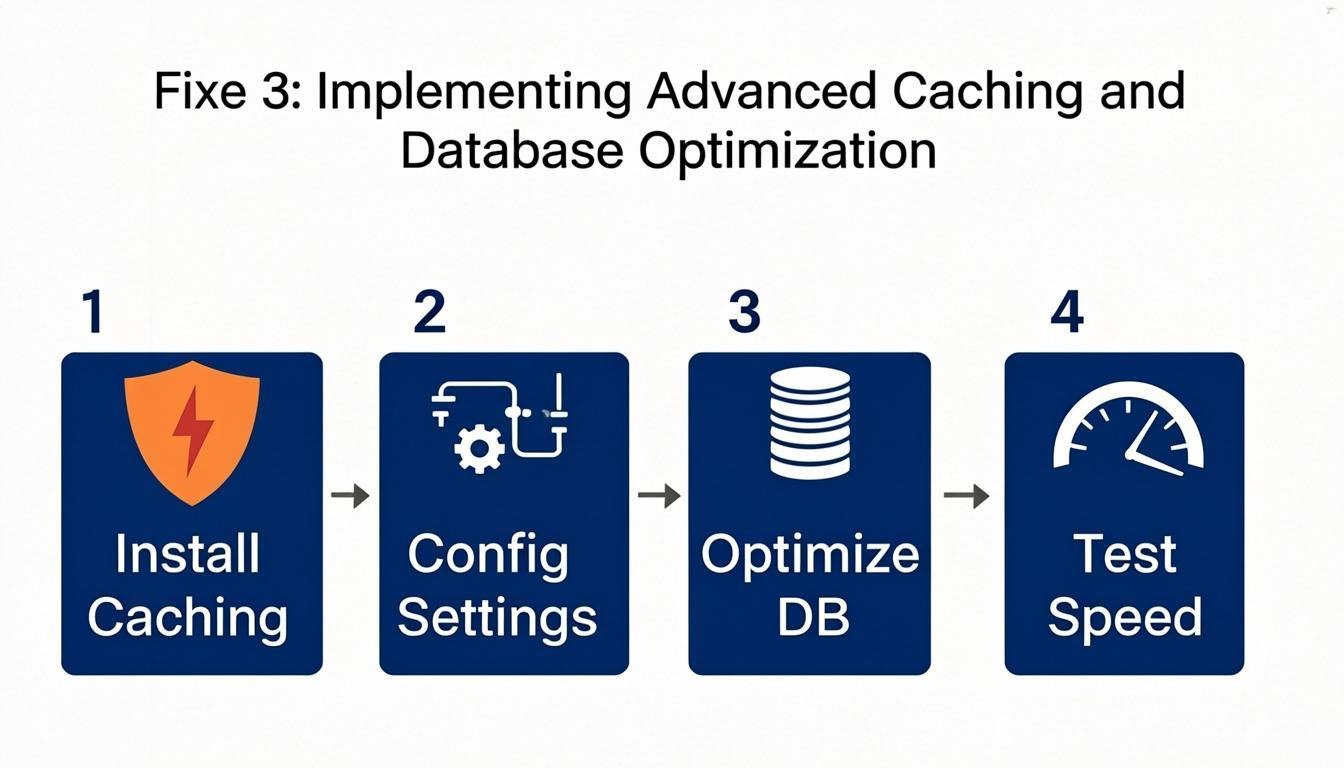
Fixe 3: Implementing Advanced Caching and Database Optimization
The real problem with most WordPress sites is that they treat the database like a static storage unit rather than a dynamic engine that needs regular care. Over time, databases accumulate clutter—post revisions, spam comments, expired transients—which all work to slow down query execution. To combat this, you need to implement a rigorous optimization schedule.
If you run a high-traffic site, especially one using WooCommerce or forums, you likely need to perform database maintenance weekly. Smaller blogs can usually get away with a monthly schedule. Start by limiting post revisions to 3–5 to prevent unnecessary table bloat. Also, make a habit of regularly deleting expired transients and autoloaded options to reduce the data load during initial page loads.
For immediate performance gains, try this workflow:
- Optimize database tables using SQL commands or a dedicated plugin to repair overhead.
- Defer non-critical JavaScript to allow HTML to render fully before scripts execute.
- Use a caching plugin to serve static HTML copies of your pages, cutting down server processing time.
- Audit autoloaded options frequently to ensure only essential data loads with WordPress.
Fixe 4: Deferring Non-Essential JavaScript and External Scripts
The real problem with most WordPress sites is that external scripts often block the main thread, stopping the browser from showing visible content right away. When tracking pixels, chat widgets, and social media integrations load synchronously, they force users to wait before they see anything. By deferring non-critical JavaScript, your site's HTML can render fully before these scripts run, which significantly improves perceived performance.
To resolve this, you have to prioritize the loading order of your assets. Delay heavy third-party scripts until a user interacts with the page or use a tool to manage when they execute.
- Use a Performance Plugin: Configure caching plugins to automatically defer JavaScript parsing or load files asynchronously.
- Leverage Tag Managers: Use Google Tag Manager to control when marketing and analytics tags fire—try triggering them only on scroll or click.
- Remove Unused Tools: Audit your external scripts and delete any trackers or plugins that do not provide essential business value.
Fixe 5: Optimizing Images and Implementing a Content Delivery Network
Unoptimized media files often act as the primary anchor dragging down performance, contributing heavily to the real problem with most WordPress sites. Large image file sizes consume huge amounts of bandwidth and delay page rendering, which is especially painful for mobile users on slower connections. Compressing visuals without sacrificing quality removes this bottleneck.
At the same time, a Content Delivery Network (CDN) solves the issue of geographical latency by storing copies of your site on servers around the world. This means a visitor in London can load data from a nearby UK server instead of waiting for a response from a data center in the United States.
Follow these steps to enhance speed immediately:
- Compress images: Use modern file formats like WebP and run existing media through lossless compression tools to shrink file sizes.
- Enable lazy loading: Set images to load only when they scroll into the user's viewport to speed up initial page rendering.
- Deploy a CDN: Integrate a network to distribute static content, reducing the physical distance data must travel to reach the visitor.
- Set strict dimensions: Define explicit width and height attributes in your HTML to prevent layout shifts during loading.
Conclusion
Many WordPress sites fail not because the platform is flawed, but because of poor management and execution. While WordPress offers unlimited customization and full data ownership, these strengths require technical discipline. The real problem with most WordPress sites is that owners often neglect essential maintenance tasks, like disabling debug modes, securing the database, or removing temporary staging URLs. This leaves the site vulnerable to performance issues and security threats.
To build a successful online presence, you have to move beyond simply installing the software and focus on consistent optimization. A lightweight, versatile theme can improve load times, while proper form redirections ensure a smooth user experience. However, keeping up with updates, security patches, and performance tweaks demands time and expertise.
Take control of your website's future today. Whether you set aside time weekly for manual maintenance or hire a professional management service, prioritizing these technical needs is the only way to unlock the full potential of your WordPress site. Do not let neglect undo your hard work—start optimizing your site now.
Comments
0